Dark and Noise Paper Pack
Flat design is efficient, but it can sometimes feel a little lifeless. That is why textures have become such an essential tool for creators of all skill levels. A dark and noise paper pack offers a specific kind of visual depth that is hard to achieve with standard gradients or solid color swatches. It combines the weight and mood of dark color schemes with the organic, grainy feel of analog media. This gives your work a grounded, tactile appearance that immediately feels more sophisticated. Whether you are designing a website, building a social media presence, or creating your own digital products, having a reliable set of dark textured backgrounds provides an instant shortcut to a professional aesthetic.
More Than Just a Texture
It helps to understand the two elements that make this resource so effective. First, the dark color palette. This is not just black. Good packs include deep charcoals, rich navy blues, muted forest tones, and warm earthy browns. These colors create a sense of depth and focus. They allow lighter elements like text or product images to pop off the screen.
Second, the noise. In graphic design, noise refers to a controlled grain or static effect layered over the background. It mimics the look of film grain or the subtle texture of high-quality paper. When you add noise to a dark background, you solve a common problem: solid black or dark grey areas can look flat and artificial on modern screens. The noise gives the surface a velvety, breathable quality. It hides banding and adds a premium feel that users might not consciously notice, but will definitely feel.
Who Benefits from a Resource Like This?
You might think that texture packs are only for professional graphic designers, but that is not the case. The practical applications are broad enough to help anyone who creates digital content.
Small Business Owners and Entrepreneurs
If you run an online store or offer a digital service, your visual branding is everything. A consistent look using dark, textured backgrounds can make your product photography or social media graphics look cohesive and high-end. Instead of spending hours trying to replicate a specific texture in editing software, you can simply drag and drop a paper background. It is a fast way to elevate a simple quote graphic or an Instagram product shot without needing advanced design skills.
Content Creators and Bloggers
Standing out in a crowded feed is difficult. Light, bright backgrounds are common. Using a dark and noise paper pack immediately gives your content a different mood. It signals a sense of depth, mystery, or sophistication. It works particularly well for niche topics like tech reviews, moody lifestyle photography, or artistic commentary. The texture adds a layer of visual interest that keeps the audience's attention on your message.
Educators and Course Creators
Presentations and slide decks can be notoriously boring. A flat white background with bullet points is easy to tune out. By using a subtle dark noise texture as your slide background, you create a strong foundation. Text placed on a dark, textured canvas often feels more legible and important. It reduces glare for viewers and creates a cinematic quality for your educational content or webinar slides.
- For Social Media: Create quote cards, announcements, and story backgrounds that feel consistent and branded.
- For Digital Products: Use textures for ebook covers, workbook pages, and checklist templates.
- For Web Design: Apply subtle noise textures as website backgrounds to reduce bounce rates and create a premium look.
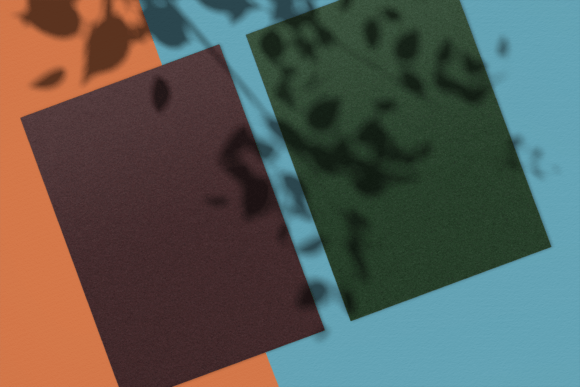
- For Mockups: Display your merchandise or logo on realistic, moody backgrounds to attract more buyers.
Practical Tips for Getting Started
If you are new to using texture packs, the process is simpler than you might expect. Most design tools like Canva, Photoshop, Affinity, or even PowerPoint support standard image formats like JPG and PNG. Here is how to make the most of them.
Start with subtlety. A very light noise texture on a deep charcoal background is versatile and easy to work with. Place your main content in the center and use a dark area of the texture behind it. If the texture is too strong behind your text, you can lower the opacity of the layer or use a soft vignette over the edges.
Think about blend modes. If you are using a design program, try setting the texture layer to Multiply or Overlay. This allows the texture to interact with the colors beneath it, creating a more integrated look. For beginners, starting with a simple composite where the texture is the background layer is the easiest way to see immediate results.
Experiment with scaling. A noise texture that is too small can look like a distracting pattern. Try scaling it up so the grain is larger and softer. This often looks more natural and less like a digital filter.
Important Considerations Before You Choose a Pack
Not all texture packs are created equal. To get real value from your purchase or download, there are a few key factors to keep in mind.
Resolution and File Quality
Always check the resolution. For digital use, a 3000x4000 pixel file is usually more than enough. If you plan on printing the textures, you need a higher DPI (dots per inch). Low-resolution textures will look pixelated and ruin the professional effect you are trying to achieve. Avoid packs that use heavily compressed JPEG files, as they can introduce artifacts that look messy rather than textured.
Variety is the Key
Look for a pack that offers more than just a single shade of black. A good dark and noise paper pack will include a range of tones. Some might have a heavy grain, while others are smooth with just a whisper of texture. Having multiple options allows you to match the mood of your project. A heavy grunge texture works for a concert poster, while a soft grain works better for a luxury brand presentation.
Licensing for Commercial Use
This is the most important step for business owners and freelancers. You must read the license agreement. Some packs are free for personal projects only. Others allow commercial use. If you plan to use the texture in a logo, on a product you sell, or in a client's marketing materials, you need a commercial license. Understanding this prevents legal headaches down the road and ensures you are using the resource ethically.
A Unique Tool for Creative Problem Solving
One of the overlooked benefits of a dark and noise paper pack is how it helps solve design problems quickly. If you have a low-resolution image that looks soft, placing it on a dark, grainy background can mask the imperfections. If you have a simple vector graphic that looks too cartoonish, a noise texture can give it grit and maturity.
It becomes a creative sandbox. You can use these textures as a base for photo manipulations, as a mask for typography, or even as a subtle overlay on video content. The value is not just in the files themselves, but in the creative freedom they give you to experiment without starting from scratch.
Bringing Your Projects to Life
Ultimately, a dark and noise paper pack is a practical investment in your workflow. It removes the technical barrier of creating complex textures from scratch. It gives you a library of professional tools that you can reach for at any moment. Whether you are a student working on a class project, a blogger refining your visual identity, or a business owner launching a new product, these textures offer a reliable way to add depth and quality.
The best projects often feel like they have a physical presence, even on a screen. By combining dark, spacious color palettes with the organic warmth of noise, you can achieve that tactile feeling effortlessly. It is a small resource that makes a significant difference in how your work is perceived.