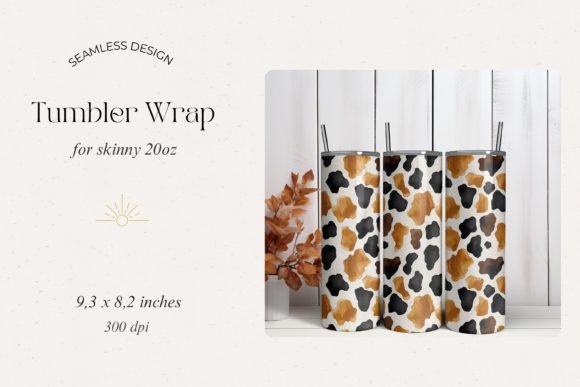
Cow Print Tumbler Wrap Sublimation File
Customizing drinkware has become a staple for small businesses, hobbyists, and creative professionals. Among the most popular patterns is cow print, a timeless look that works well for tumblers, mugs, and bottles. The cow print tumbler wrap sublimation file is a digital design specifically prepared for sublimation transfer. It typically includes the repeating cow hide pattern, sized and formatted for standard tumbler dimensions, and designed to print onto sublimation paper before being heat-pressed onto a coated tumbler. Understanding how this file fits into your broader production process is essential for achieving consistent, high-quality results.
What the Cow Print Sublimation File Provides
A cow print tumbler wrap sublimation file is not merely an image. It is a pre-scaled, often layered design that accounts for tumbler height and circumference. Many files include alignment guides, registration marks, or instructions for different tumbler sizes—such as 20 oz straight, 30 oz tapered, or skinny tumblers. This saves you the time of manually resizing or tiling a pattern. The file format is usually PNG, SVG, or PDF with high resolution (300 dpi recommended) so that the print remains crisp after pressing. Because cow print relies on irregular black and white patches, the design must also handle color separation cleanly—no fuzzy edges, no unwanted transparency.
- Resolution: Look for files at 300 dpi to avoid pixelation after transfer.
- Format: PNG with transparent background works for most printers; SVG allows scaling in design software.
- Sizing: Check that the wrap length matches your tumbler circumference plus a small overlap.
- Mirroring: Sublimation requires the image to be reversed before printing—most files are provided in a non-mirrored version, so you must flip horizontally in your RIP software or printer settings.
Before you even open the file, confirm that your sublimation printer, paper, and tumbler coating are compatible. A cow print design with high contrast may reveal any misalignment or pressure inconsistencies during pressing.
Preparation: Getting the File Ready for Transfer
Integrating a cow print tumbler wrap sublimation file begins with preparation. Open the file in your preferred design software—Adobe Illustrator, CorelDRAW, Inkscape, or a dedicated sublimation layout tool. Check the dimensions against your actual tumbler. Tapered tumblers require a wrap that is wider at the top than the bottom; you may need a template. Many cow print files are designed for straight-sided tumblers; if you use a tapered one, you will need to adjust wrap shape accordingly.
Color management is another critical step. Sublimation inks produce colors differently on polyester coating than on paper. Cow print is mostly black and white, but the black can shift to a brownish or greenish tint if the ICC profile is not correct. Use a calibrated monitor and the correct profile for your printer and paper combination. Print a small test swatch first on scrap sublimation paper and press onto a test tile or old tumbler to confirm the black is truly black and the white areas remain unprinted (since sublimation cannot print white, the tumbler’s white coating shows through). If your cow print file includes gray tones or background colors, verify those as well.
Once the file is sized and colors are verified, mirror the image. Sublimation always requires horizontal flip. Print onto high-quality sublimation paper using the highest quality print mode. Allow the ink to dry completely before handling to avoid smudging. For longer production runs, it helps to organize your cow print files into folders by tumbler size and pattern variant (e.g., classic black-and-white cow, pink cow, reverse cow). This organization speeds up retrieval and prevents printing the wrong size.
Workflow Integration: From Print to Press
The cow print tumbler wrap sublimation file enters the workflow at the print stage, but its influence extends through pressing and finishing. After printing, you need to cut the wrap precisely. Some files come with cut lines or guides. Measure the overlap—typically 5–10 mm—and trim the paper so that the design ends exactly at the overlap point. Use a sharp craft knife or rotary cutter for clean edges.
Applying the wrap to the tumbler requires careful alignment. Start by taping the leading edge of the sublimation paper to the tumbler, then roll the paper around the tumbler, keeping it taut and free of wrinkles. Use heat-resistant tape (e.g., polyimide or kapton tape) to secure the paper at top, bottom, and along the seam. Avoid taping over the print area if possible, as tape can leave a mark. Some users wrap a silicone band around the taped paper to ensure even pressure, though this is optional.
Press time and temperature depend on the tumbler coating and sublimation equipment. A typical setting for a 20 oz straight tumbler is 400°F (204°C) for 60–90 seconds in a convection oven or tumbler heat press. If using a mug press, you may need to rotate the tumbler and press in sections. The cow print pattern, with its large irregular patches, can hide slight unevenness, but you should still press at consistent temperature and pressure to avoid ghosting (faint double images) or patchy areas.
After pressing, allow the tumbler to cool completely before removing the paper. Peel the paper slowly. If any part of the cow print did not transfer, it is often due to insufficient pressure, improper taping, or an under-cured coating. Keep a record of successful settings for each tumbler type so you can repeat the process reliably.
Quality Control and Consistency Across Projects
Using a single cow print tumbler wrap sublimation file across multiple tumblers allows you to build a consistent product line. However, batch-to-batch variation can occur if your printer heads become clogged, paper absorbs moisture, or press temperature fluctuates. Implement a simple quality check after each press: inspect the seam alignment, check that black patches are solid, and verify that no white unprinted areas appear where they should not. If you produce tumblers for clients or for retail, keep a reference tumbler with the approved cow print near your workstation. Compare each finished piece to that benchmark.
For long-term use, store your cow print files in an organized digital library. Tag them with metadata: tumbler size, design variant, date created, and any special notes (e.g., “mirrored” or “includes registration marks”). If you edit the file—resizing for a new tumbler model or adjusting the pattern scale—save the new version with a distinct filename. This avoids confusion months later.
Scaling up production might require you to pre-print multiple wraps at once. Keep printed wraps in a cool, dry place away from direct sunlight, stacked flat between sheets of protective paper. Sublimation prints can fade or bleed if exposed to humidity or excessive heat before pressing. Plan your printing batch just before pressing to minimize storage time.
Usability Considerations for Different Users
Hobbyists and small business owners benefit most from a well-prepared cow print tumbler wrap sublimation file because it reduces trial and error. If you are new to sublimation, look for files that include a detailed instruction sheet or video link. Some creators bundle the file with a printable template that you can wrap around the tumbler to confirm fit before printing. That extra step saves paper and ink.
For professionals running a high-volume custom tumbler business, a cow print file that is vector-based (e.g., SVG) allows you to scale the pattern to any tumbler diameter without losing quality. You can also change colors instantly, creating pink cow, blue cow, or neon accents for special orders. Pair the file with a sublimation workflow template in your design software that automatically mirrors, sizes, and positions the design for your most common tumbler sizes. This automation cuts preparation time considerably.
Educators teaching sublimation techniques can use the cow print file as a case study for alignment, color management, and heat transfer physics. The high-contrast pattern makes it easy for students to see if they misaligned the wrap or used uneven pressure. Bloggers and content creators can demonstrate step-by-step pressing using the same file, giving viewers a reproducible project.
Practical Implementation Tips for Smooth Execution
- Test before committing: Always press a sample on a test tumbler or a sublimation-coated stainless steel panel. Adjust time, temperature, and pressure until the cow print transfers perfectly.
- Use a tape jig: Create a reusable alignment guide by marking the tumbler’s seam position on a strip of tape. This speeds up repeated wraps of the same file.
- Combine with other designs: Cow print pairs well with names, logos, or decorative bands. If your sublimation file is layered, you can add text or graphics above or below the pattern while keeping the cow print intact.
- Check tumbler coating quality: Low-quality coatings may produce a yellow tint when heated. Test your blank tumblers with a small sublimation patch before full production. Cow print’s white areas rely on the tumbler’s base color, so a yellowed coating ruins the contrast.
- Document your settings: Keep a log for each tumbler model you use: press time, temperature, brand of paper and ink, and any quirks (e.g., tapered tumblers need 10 seconds longer). This documentation ensures you can repeat successful results even months later.
Long-Term Value and File Management
A cow print tumbler wrap sublimation file is a reusable asset. Unlike a one-time graphic, a well-structured file can be adapted for different tumblers, combined with other elements, and updated as trends evolve. Store the original file in a lossless format (PNG or SVG) and keep a working copy for editing. Back up your file library to cloud storage or an external drive. When you purchase or create a new cow print variant, immediately test it on a consistent blank and note the adjustments needed.
Over time, you will build a personalized library of sublimation files with known properties—this one works best on 20 oz straight tumblers, that one requires a slight size reduction for 30 oz tapered. Such knowledge makes your workflow efficient and predictable. The cow print tumbler wrap sublimation file is not merely a design; it is a tool that, when integrated thoughtfully, saves time, reduces waste, and helps you deliver a product customers recognize and trust.